When I installed Codeman and opened its settings, the first thing I saw was that it starts Claude Code with --dangerously-skip-permissions by default. No confirmations. The agent runs whatever command it decides to run.
The name is honest, at least.
I wanted exactly that: agents that work alone while I do something else. But I only accept it if the place where they run is built so that “whatever command” cannot hurt much. This post is about that place. It is the second one of the series about my AI agent system. The first one explains why I built it.
The Homelab
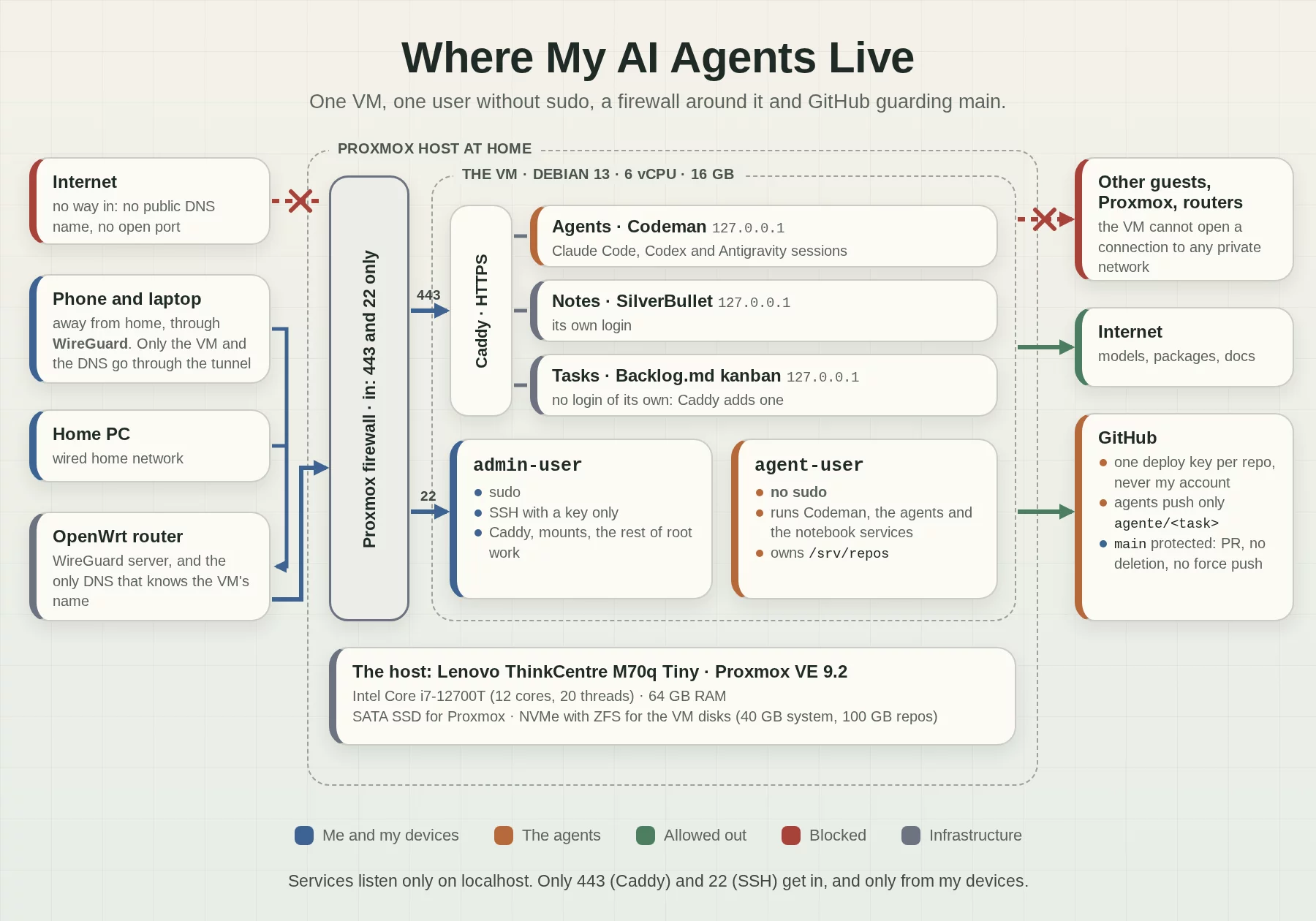
Everything runs on a mini PC at home: a Lenovo ThinkCentre M70q Tiny with an Intel Core i7-12700T (12 cores, 20 threads) and 64 GB of RAM, running Proxmox VE 9.2. It has two disks: a SATA SSD for Proxmox itself and an NVMe with ZFS for the VM disks.
The VM is Debian 13, created from the genericcloud image with cloud-init. It has 6 vCPU, 16 GB of fixed RAM (no ballooning) and two disks, both on the NVMe: 40 GB for the system and 100 GB for /srv/repos, where all the repositories live.
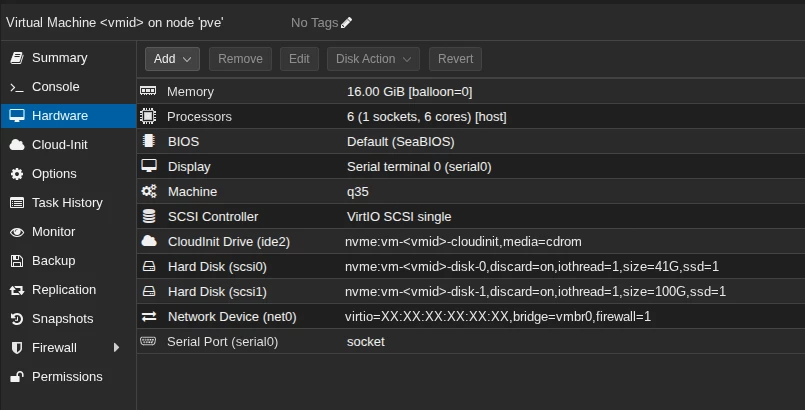
Proxmox shows the system disk as 41G because I grew the cloud image by 38 GB, and the image already had a few. Close enough to 40.
Why these numbers? The agents spend most of their time waiting for the model, so 6 vCPU are more than enough, and the CPU only works when they build or run tests. And the separate disk for repositories means I can rebuild the system without touching the work.
The Firewall Does the Real Isolation
The VM is in the same network as everything else at home. That means the router cannot filter traffic between them, but the Proxmox firewall can, because it sits on the VM’s network card.
The rules of the VM, with documentation addresses (192.0.2.0/24 is the home network, 198.51.100.0/24 the WireGuard clients, and both form the IPSet mgmt):
| # | Direction | Action | Destination | Protocol / port | What for |
|---|---|---|---|---|---|
| 1 | in | ACCEPT | tcp 443 | HTTPS from +mgmt | |
| 2 | in | ACCEPT | tcp 22 | SSH from +mgmt | |
| 3 | in | ACCEPT | icmp | ping from +mgmt | |
| 4 | out | ACCEPT | 192.0.2.1 | udp 53 | DNS of the router |
| 5 | out | ACCEPT | 192.0.2.1 | tcp 53 | DNS of the router |
| 6–10 | out | DROP | 10.0.0.0/8, 172.16.0.0/12, 192.168.0.0/16, 100.64.0.0/10, 169.254.0.0/16 | any | no private networks |
The input policy is DROP and the output policy ACCEPT. So the internet works, but the VM cannot start a connection to Proxmox, the routers or the other guests on the same host. Replies to my own SSH session still pass, because conntrack accepts them.
The order matters. The first rule that matches wins, so the DNS rules must be above the DROPs.
To check it, from inside the VM:
curl -sk --max-time 5 https://192.0.2.10:8006 && echo "BAD: I reach Proxmox" || echo "ok: Proxmox blocked"
curl -s --max-time 5 https://example.org >/dev/null && echo "ok: internet works"
The first one has to fail and the second one has to answer.
Only From Home or Through WireGuard
The VM’s name does not exist in public DNS. Only the DNS of my OpenWrt router knows it. From outside, my phone and my laptop connect with WireGuard to the router, and each one has its own peer. The laptop’s looks like this:
[Interface]
PrivateKey = <private key>
Address    = 198.51.100.3/32
DNS        = 198.51.100.1

[Peer]
PublicKey           = <public key>
PresharedKey        = <preshared key>
Endpoint            = vpn.example.com:51820
AllowedIPs          = 192.0.2.13/32, 198.51.100.1/32
PersistentKeepalive = 25
AllowedIPs only sends the VM and the DNS through the tunnel. Proxmox stays out of reach even with the VPN on.
Caddy in Front, Everything Else on Localhost
I wanted real HTTPS without exposing anything. Caddy gets a Let’s Encrypt certificate with the DNS-01 challenge: it creates a temporary TXT record with a Cloudflare API token limited to that zone, so no public record points to the VM.
The Caddy package does not include the Cloudflare plugin, so I built it with xcaddy and installed it with dpkg-divert, so apt upgrade does not replace it.
agents.home.arpa {
	tls {
		dns cloudflare {env.CF_API_TOKEN}
		resolvers 1.1.1.1 1.0.0.1
	}
	reverse_proxy 127.0.0.1:3000 {
		flush_interval -1
	}
}

tasks.home.arpa {
	tls {
		dns cloudflare {env.CF_API_TOKEN}
	}
	basic_auth {
		<user> <hash>
	}
	reverse_proxy 127.0.0.1:6420
}
flush_interval -1 is there because Codeman sends its dashboard by SSE, and with buffering the page freezes. The second site is the Backlog.md kanban, which has no login of its own, so Caddy adds one. The notes site, SilverBullet, is like the first one and has its own login. More about both in the next post.
Every service listens on 127.0.0.1. This is what ss -ltn shows, trimmed:
Local Address:Port
0.0.0.0:443         # Caddy
127.0.0.1:3000      # Codeman
127.0.0.1:3001      # SilverBullet
127.0.0.1:6420      # Backlog.md kanban
0.0.0.0:22          # SSH
Two Users, and Only One Has Sudo
admin-user has sudo and enters only with an SSH key. I use it for the few things that need root: Caddy, /etc/fstab and little more.
agent-user has no sudo. It runs Codeman, the agents and the notebook services as systemd user services, and it owns /srv/repos:
sudo adduser --disabled-password --gecos "" agent-user
sudo chown agent-user:agent-user /srv/repos
sudo loginctl enable-linger agent-user   # its services start without a login session
A warning if you copy this: log in as that user with ssh, not with sudo su. Otherwise systemctl --user fails with Failed to connect to bus.
My Subscriptions, Not the API
The agents are Claude Code with my Pro/Max plan, Codex with ChatGPT and the Antigravity CLI with Google AI Pro. Each one logged in once inside the VM, and their credential folders are chmod 700. No API keys and no extra bills, which was one of my goals.
Antigravity is there because Gemini CLI stopped serving consumer accounts in June 2026, and Antigravity CLI is its replacement. Node.js 24 comes from NodeSource, because the version in Debian is too old for Codeman.
Codeman
Codeman runs agent sessions in the browser, also from my phone. I installed it as agent-user with --local, so it only listens on 127.0.0.1, and as a user service. The installer never writes the password, so it goes in its own file:
# ~/.config/systemd/user/codeman-web.service.d/override.conf
[Service]
EnvironmentFile=%h/.config/codeman.env
# ~/.config/codeman.env (chmod 600)
CODEMAN_USERNAME=<user>
CODEMAN_PASSWORD=<secret>
CODEMAN_ALLOWED_HOSTS=agents.home.arpa
CODEMAN_ALLOWED_HOSTS makes it refuse any other name, including the IP.
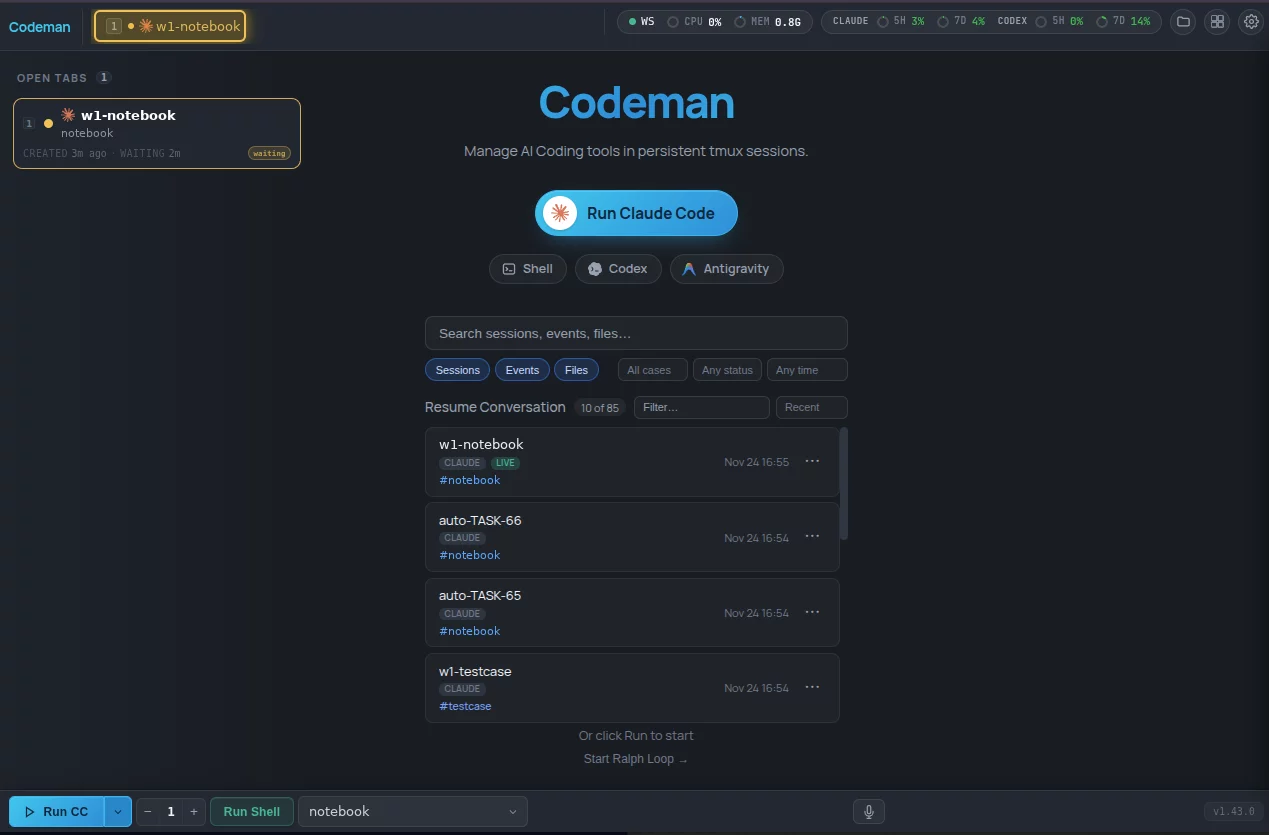
Codeman works with cases, and it creates each one as a new folder. It does not accept an existing folder, and a symlink disappears from the list after the first time. So my notebook is a case with a bind mount: Codeman created the folder, and the notebook repository is mounted on top. After each Codeman update I also regenerate its hooks, because the existing cases keep the old ones. How I found out about the symlink is a story for the last post.
GitHub: One Key per Repository
The VM has a deploy key with write access for each repository the agents use, and an SSH alias for each one. Never a key in my account, because that would open all my repositories.
Host github-blog
    HostName github.com
    User git
    IdentityFile ~/.ssh/id_ed25519
    IdentitiesOnly yes
main in the blog repository has a ruleset: no deletion, no force push and a pull request before merging.
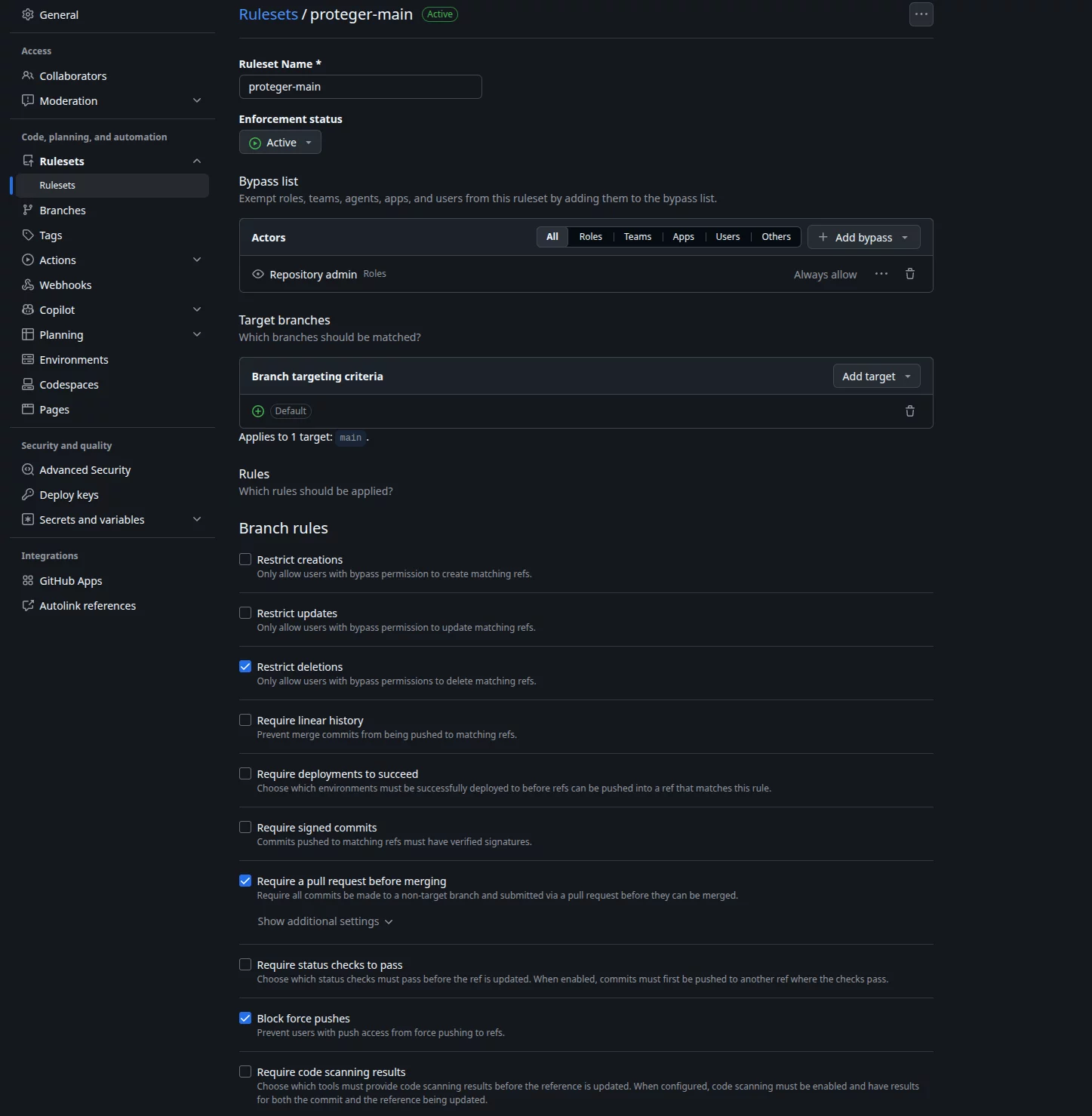
The only one in the bypass list is the repository admin, which is me. The deploy key is not there.
The agents work in a worktree and a branch agente/<task>, and they never push to main. They do not use gh either: they leave a link with the pull request already filled in, and I open it.
Why I Accept No Confirmations
With all of this, --dangerously-skip-permissions looks different. The user has no sudo, the firewall keeps the VM away from the rest of my home, and GitHub blocks force pushes and direct changes to main. If an agent does something stupid, the damage stays inside the VM and inside its own branch.
Tools follow the same idea. Hugo and the rest go in /srv/repos/.tools/<tool>-<version>/, installed by version, and there is no Docker.
What This Does Not Cover
It is not perfect, and I prefer to say where.
- One user for everything. All the agents and SilverBullet run as
agent-user. My rules tell the agents not to read secrets, but technically they can read any file of that user, including the credentials of the notes app. - No containers. Codeman can run sessions in containers, but I did not set that up. Every agent sees the whole home of
agent-user. - The CLIs’ own config is outside my barriers. In a later post I protect the rules files of the notebook, but
~/.claude,~/.codexand~/.geministay writable. - No backups. I take VM snapshots by hand before leaving the agents alone, and the dispatcher does not take any. There is no backup job, even if my own guide says it is not optional, because the NVMe is a single disk without redundancy. Today, what saves the work is
git push.
Conclusion
None of these pieces is special alone. A user without sudo, a firewall, localhost, a VPN and a protected branch. Together they are what lets me close the laptop while an agent works.
And the backups are on my list. Really.