Update — July 30, 2026: After publishing this guide, I found a DNS problem in the final hardened configuration: clients could still reach Internet addresses by IP, but domain names stopped working after reconnecting to the SSID. Jump to the updated DNS fix.
I wanted one WiFi network at home to always use CyberGhost, but I did not want to send all my home traffic through the VPN.
My normal devices had to continue using the ISP connection. Only the devices connected to a dedicated SSID called CyberGhost should go through OpenVPN.
I also wanted it to fail closed. If the VPN tunnel stopped, the clients on that SSID had to lose Internet access instead of falling back to the normal connection. Otherwise I could think that a device was using the VPN when it was not, and that was not what I was looking for
The idea sounded simple: create another WiFI network and send it to the VPN. Well, it was not so simple.
During the process I managed to add a gateway pointing to the router itself and I lost normal access to it. I also found that scp was trying to use SFTP, and that PBR expected an interface called wan that does not exist in my setup.
This is the final configuration that worked for me. I am including the errors because they are probably the most useful part.
This guide describes my Xiaomi AX3600 running OpenWrt
24.10.7withpbr1.2.2-r20. Interface names and subnets can be different on another router, so check your own configuration before copying commands.
What I Wanted to Build
These were my rules:
- The normal default route must stay through my first router,
10.1.1.1. - Only clients from
192.168.50.0/24must use CyberGhost. - OpenVPN must not replace the global default route.
- The vpn WIFI must only forward to the VPN firewall zone.
- If
tun0disappears, the VPN WIFI must have no Internet. - The normal LAN and WiFi must continue working if CyberGhost is down.
This is the final traffic flow:
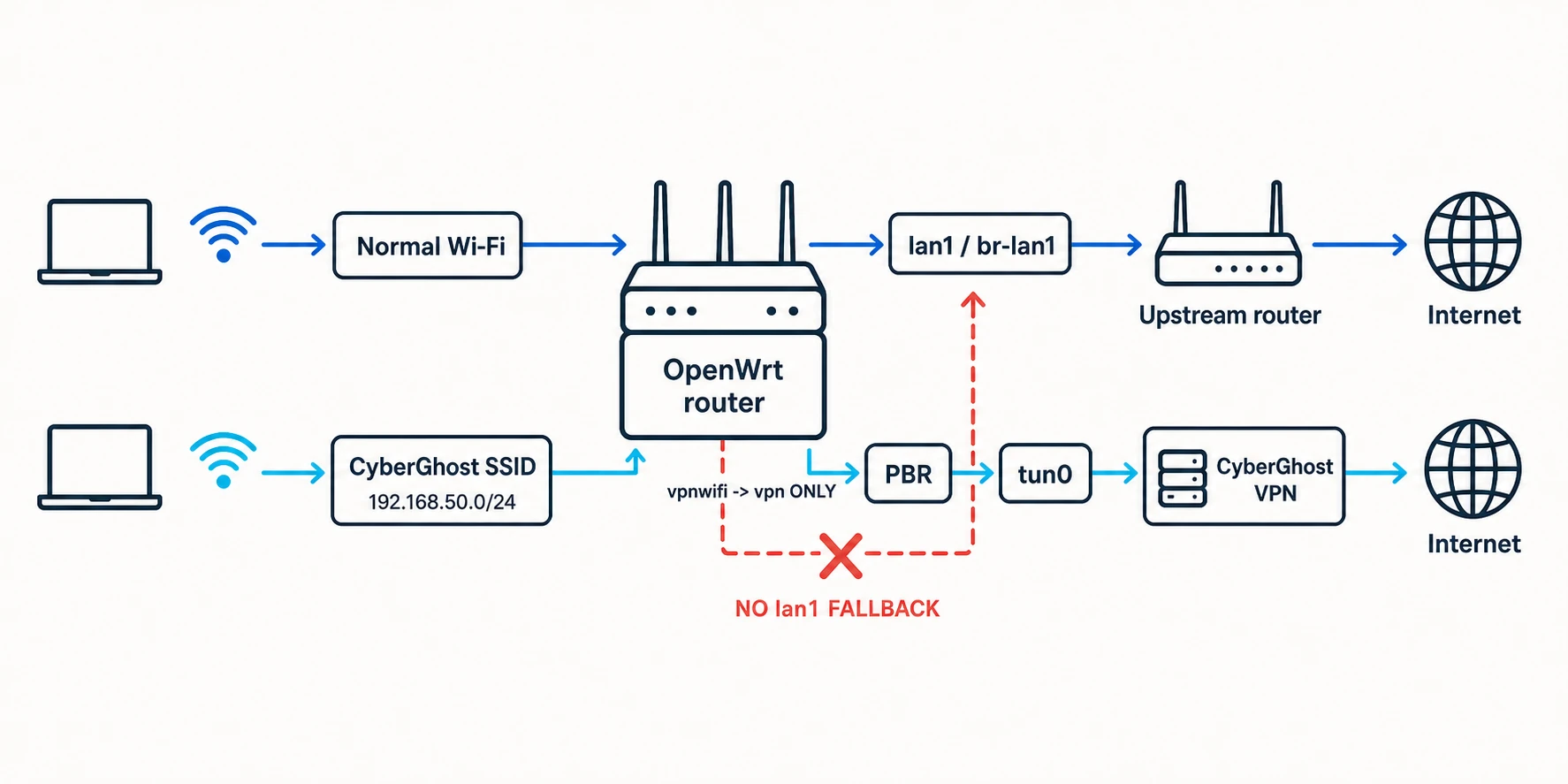
My network uses two routers. I will call them R1 and R2:
Internet
  |
R1: 10.1.1.1
  |
R2: Xiaomi AX3600 with OpenWrt
  |
  +-- uplink: lan1 / br-lan1 / 10.1.1.2/24
  +-- normal LAN: br-lan / 10.10.10.1/24
  +-- VPN tunnel: tun0
  +-- VPN Wi-Fi: br-vpnwifi / 192.168.50.1/24
The tun0 address is assigned by the VPN and can change. Do not hardcode an address observed in one OpenVPN session.
1. Make a Backup Before Touching Routes
Network and firewall changes can make the router inaccessible very easily. I learned this in the practical way.
Before changing anything, I copied the important configuration files:
cp /etc/config/network /root/network.ok
cp /etc/config/dhcp /root/dhcp.ok
cp /etc/config/firewall /root/firewall.ok
cp /etc/config/wireless /root/wireless.ok
If PBR is already installed and /etc/config/pbr exists, copy it too:
cp /etc/config/pbr /root/pbr.ok
It is also a good idea to export a full backup from System -> Backup / Flash Firmware -> Generate archive in LuCI.
If possible, have an Ethernet cable close. Wi-Fi is not the best recovery plan when you are changing the Wi-Fi network itself.
2. Install OpenVPN and PBR
On OpenWrt 24.10.x, I installed the OpenVPN and policy-based routing packages with opkg:
opkg update
opkg install openvpn-openssl luci-app-openvpn pbr luci-app-pbr
I did not run a blind opkg upgrade. I only needed four packages, and updating everything could create a completely different problem.
3. Download the CyberGhost OpenVPN Files
From my Cyberghost account I created a manual OpenVPN configuration. The downloaded files were:
openvpn.ovpn
ca.crt
client.crt
client.key
CyberGhost also generated a username and password for OpenVPN. They are not necessarily the same username and password used to log in to the website or app.
An Error: scp Tried to Use SFTP
When I tried to copy the files, I found this:
ash: /usr/libexec/sftp-server: not found
scp: Connection closed
Modern versions of scp use SFTP by default, but my OpenWrt installation with Dropbear did not have that SFTP server.
The fix was adding -O to force the old SCP protocol:
scp -O openvpn.ovpn ca.crt client.crt client.key [email protected]:/etc/openvpn/
Then, on the router, I protected the private key:
chmod 600 /etc/openvpn/client.key
4. Configure OpenVPN Without Routing Everything Through It
I used cyberghost.conf as the profile name. If the downloaded file is called openvpn.ovpn, it can be renamed with:
mv /etc/openvpn/openvpn.ovpn /etc/openvpn/cyberghost.conf
Then I created the authentication file:
umask 077
vi /etc/openvpn/cyberghost.auth
Its content is only the generated OpenVPN credentials, one per line:
CYBERGHOST_GENERATED_USERNAME
CYBERGHOST_GENERATED_PASSWORD
And I set its permissions:
chmod 600 /etc/openvpn/cyberghost.auth
Inside /etc/openvpn/cyberghost.conf, I used absolute paths:
ca /etc/openvpn/ca.crt
cert /etc/openvpn/client.crt
key /etc/openvpn/client.key
auth-user-pass /etc/openvpn/cyberghost.auth
The most important line for this split-routing setup is:
pull-filter ignore "redirect-gateway"
This prevents a redirect-gateway pushed by the VPN server from replacing the normal route of the router.
If the downloaded profile contains an explicit line like this:
redirect-gateway def1
remove it or comment it. pull-filter ignores a pushed option, but it does not remove a line already written in the local configuration.
After that I enabled and restarted OpenVPN:
service openvpn enable
service openvpn restart
And checked the tunnel, the log and the routes:
ip addr show tun0
logread -e openvpn | tail -30
ip route
The OpenVPN log should contain:
Initialization Sequence Completed
More importantly, my normal default route still had to be:
default via 10.1.1.1 dev br-lan1
These routes would be bad signs for this design:
default dev tun0
0.0.0.0/1 dev tun0
128.0.0.0/1 dev tun0
They make sense for a complete-router VPN, but not for what I wanted.
I checked this route after every important change. Seeing tun0 up is not enough if the router also forgot how to reach the normal Internet.
5. Declare tun0 as an OpenWrt Interface
OpenVPN creates tun0, but I also needed a logical OpenWrt interface so the firewall and PBR could refer to it.
I named that interface vpn:
uci -q delete network.vpn
uci set network.vpn='interface'
uci set network.vpn.proto='none'
uci set network.vpn.device='tun0'
uci commit network
service network reload
Then I verified both the logical interface and the tunnel device:
ubus call network.interface.vpn status
ip addr show tun0
6. Create the Isolated VPN Wi-Fi Network
First I created an empty bridge named br-vpnwifi:
uci -q delete network.vpnwifi_dev
uci set network.vpnwifi_dev='device'
uci set network.vpnwifi_dev.type='bridge'
uci set network.vpnwifi_dev.name='br-vpnwifi'
uci set network.vpnwifi_dev.bridge_empty='1'
Then I created a static interface named vpnwifi:
uci -q delete network.vpnwifi
uci set network.vpnwifi='interface'
uci set network.vpnwifi.proto='static'
uci set network.vpnwifi.device='br-vpnwifi'
uci set network.vpnwifi.ipaddr='192.168.50.1/24'
uci set network.vpnwifi.defaultroute='0'
uci commit network
service network reload
Immediately after reloading the network, I checked the route table:
uci show network.vpnwifi
ubus call network.interface.vpnwifi status
ip route
The important routes were:
default via 10.1.1.1 dev br-lan1
192.168.50.0/24 dev br-vpnwifi
The Big Error: Adding the Router as Its Own Gateway
At one point I configured this:
network.vpnwifi.gateway='192.168.50.1'
It looked reasonable for one second because 192.168.50.1 is the gateway that Wi-Fi clients use. But for the router itself, 192.168.50.1 is the router. I was telling it to use itself as a gateway.
That produced this route:
default via 192.168.50.1
And normal access to R2 stopped working. Very useful.
If the router is still accessible, remove the bad gateway immediately:
uci delete network.vpnwifi.gateway 2>/dev/null
uci set network.vpnwifi.defaultroute='0'
uci commit network
service network reload
ip route
The vpnwifi interface needs an IP address, but it must not have a default gateway.
Recovering with OpenWrt Failsafe
In my case the bad route was enough to require a failsafe recovery. The exact button timing and recovery interface can depend on the router, but the general process was:
- Disconnect R1 and the other clients from R2.
- Connect a computer to R2 by Ethernet.
- Give the computer a static address such as
192.168.1.10/24, with no gateway. - Reboot R2 and trigger the OpenWrt failsafe window with the reset button.
- Check that
192.168.1.1answers and connect withssh [email protected]. - Make the writable root filesystem available:
mount_root
The important recovery action is to inspect /etc/config/network and remove the self-referential gateway. If necessary, temporarily disable vpnwifi and PBR before rebooting:
uci delete network.vpnwifi.gateway 2>/dev/null
uci set network.vpnwifi.defaultroute='0'
uci set network.vpnwifi.auto='0'
uci set pbr.config.enabled='0'
uci commit network
uci commit pbr
reboot -f
Those last commands are recovery examples, not something to copy without checking the current state. If the normal LAN was also modified, restore it from the backup made at the beginning.
The auto='0' value above is only temporary. Before rebuilding the VPN WiFi, remove it so the interface can start normally again:
uci -q delete network.vpnwifi.auto
uci commit network
Once I had access again, I rebuilt the VPN Wi-Fi layer by layer and checked ip route after every network change. A little repetitive, yes, but better than entering failsafe two times.
7. Add DHCP and the CyberGhost SSID
I configured DHCP for the isolated subnet:
Updated July 30, 2026: The
dhcp_optionline below is part of the correction. I originally described public DNS as optional, but that was wrong once the firewall input policy was changed toREJECT. The full explanation is in the update below.
uci -q delete dhcp.vpnwifi
uci set dhcp.vpnwifi='dhcp'
uci set dhcp.vpnwifi.interface='vpnwifi'
uci set dhcp.vpnwifi.start='100'
uci set dhcp.vpnwifi.limit='150'
uci set dhcp.vpnwifi.leasetime='12h'
uci set dhcp.vpnwifi.dhcpv4='server'
uci set dhcp.vpnwifi.force='1'
uci set dhcp.vpnwifi.ignore='0'
uci add_list dhcp.vpnwifi.dhcp_option='6,1.1.1.1,1.0.0.1'
uci commit dhcp
service dnsmasq restart
This gives clients addresses starting at 192.168.50.100 and advertises 1.1.1.1 and 1.0.0.1 as their DNS servers. DHCP option 6 is the DNS server option.
Do not add the same DHCP option several times.
For the wireless part, I used LuCI:
- Go to
Network -> Wireless. - Add an access point on the radio you want to use.
- Set the SSID to
CyberGhost. - Attach it to the
vpnwifinetwork only. - Configure WPA2/WPA3 security as appropriate.
The word only is important here. If the SSID is also attached to lan, the isolation is already wrong before PBR even enters the story.
8. Make DHCP Work Before Hardening the Firewall
During the initial test I created a permissive input policy for the new zone. This removed the firewall as one possible reason for DHCP not working:
uci -q delete firewall.vpnwifi
uci set firewall.vpnwifi='zone'
uci set firewall.vpnwifi.name='vpnwifi'
uci add_list firewall.vpnwifi.network='vpnwifi'
uci set firewall.vpnwifi.input='ACCEPT'
uci set firewall.vpnwifi.output='ACCEPT'
uci set firewall.vpnwifi.forward='REJECT'
uci commit firewall
service firewall restart
At this point a connected client should receive:
Address: 192.168.50.x/24
Gateway: 192.168.50.1
The WiFi Connected but Had No IPv4
Another problem I found was a client that connected to the SSID but only had an IPv6 link-local address like fe80::.... There was no 192.168.50.x address.
That is a DHCP or local network problem, not a reason to start changing PBR. I checked it in this order:
ubus call network.interface.vpnwifi status
uci show dhcp.vpnwifi
service dnsmasq status
uci show firewall.vpnwifi
uci show wireless | grep -E "ssid|network"
The interface must own 192.168.50.1/24, DHCP must listen on vpnwifi, the SSID must be attached to vpnwifi, and the temporary firewall input policy must allow the client to reach the router.
If the interface status contains an empty IPv4 list:
"ipv4-address": []
restore its static configuration before continuing:
uci set network.vpnwifi.proto='static'
uci set network.vpnwifi.device='br-vpnwifi'
uci set network.vpnwifi.ipaddr='192.168.50.1/24'
uci set network.vpnwifi.defaultroute='0'
uci commit network
service network reload
Once DHCP worked, I hardened the zone and allowed only DHCP input:
uci -q delete firewall.vpnwifi_dhcp
uci set firewall.vpnwifi_dhcp='rule'
uci set firewall.vpnwifi_dhcp.name='Allow-DHCP-VPNWiFi'
uci set firewall.vpnwifi_dhcp.src='vpnwifi'
uci set firewall.vpnwifi_dhcp.proto='udp'
uci set firewall.vpnwifi_dhcp.dest_port='67'
uci set firewall.vpnwifi_dhcp.family='ipv4'
uci set firewall.vpnwifi_dhcp.target='ACCEPT'

uci set firewall.vpnwifi.input='REJECT'
uci commit firewall
service firewall restart
The final configuration in this article does not open TCP/UDP port 53 from vpnwifi to the router. Clients use the public DNS servers advertised by DHCP instead.
Update July 30 2026: DNS Fix After Hardening the Firewall
On July 29, after I thought the setup was finished, the CyberGhost Wi-Fi looked broken again. A client joined the SSID, received an address such as 192.168.50.120/24, and had the expected gateway:
default via 192.168.50.1
However, websites did not load and DNS returned errors such as SERVFAIL or connection refused.
The important detail was that this was not a complete loss of connectivity. A direct ping to a public IP still worked:
ping -c 3 1.1.1.1
Queries sent explicitly to public DNS servers also worked:
nslookup openwrt.org 1.1.1.1
nslookup openwrt.org 1.0.0.1
But a query sent to the router failed:
nslookup openwrt.org 192.168.50.1
On OpenWrt, dnsmasq was listening on 192.168.50.1:53, but the hardened firewall zone had:
firewall.vpnwifi.input='REJECT'
There was no input rule allowing port 53. During the earlier setup, vpnwifi.input='ACCEPT' had allowed clients to use the router as DNS. After hardening the zone, DHCP could still give 192.168.50.1 to a client as its implicit DNS server, but the firewall rejected the queries.
An older DHCP lease, temporary DNS configuration or client cache can hide this problem for a while. That is why it became visible only after reconnecting to the Wi-Fi.
The fix I applied was to replace any existing DNS option and explicitly advertise public DNS servers:
uci -q delete dhcp.vpnwifi.dhcp_option
uci add_list dhcp.vpnwifi.dhcp_option='6,1.1.1.1,1.0.0.1'
uci commit dhcp
service dnsmasq restart
Then the client must renew its DHCP lease. Disconnecting and reconnecting to the SSID is enough. On my Linux client with NetworkManager I used:
nmcli device disconnect wlp4s0
nmcli device connect wlp4s0
resolvectl status wlp4s0
The last command should show:
DNS Servers: 1.1.1.1 1.0.0.1
With this correction, DNS requests are still normal client traffic from 192.168.50.0/24, so PBR sends them through tun0 like the rest of the traffic. The firewall remains hardened, and the kill switch is not weakened.
Another possible solution is to open TCP/UDP port 53 from vpnwifi to the router and use OpenWrt as DNS. I did not choose that final configuration. Requests forwarded by dnsmasq become traffic originated by the router and could use the normal lan1 uplink unless an additional policy forces and verifies them through the VPN. That could create a DNS leak.
9. Create the vpn Firewall Zone and Kill Switch
The OpenVPN interface needs its own firewall zone with masquerading:
uci -q delete firewall.vpn
uci set firewall.vpn='zone'
uci set firewall.vpn.name='vpn'
uci add_list firewall.vpn.network='vpn'
uci set firewall.vpn.input='REJECT'
uci set firewall.vpn.output='ACCEPT'
uci set firewall.vpn.forward='REJECT'
uci set firewall.vpn.masq='1'
uci set firewall.vpn.mtu_fix='1'
uci commit firewall
service firewall restart
Without masquerading, the private 192.168.50.0/24 addresses cannot leave cleanly through the commercial VPN tunnel.
Then I created the only forwarding from vpnwifi:
uci -q delete firewall.vpnwifi_vpn
uci set firewall.vpnwifi_vpn='forwarding'
uci set firewall.vpnwifi_vpn.src='vpnwifi'
uci set firewall.vpnwifi_vpn.dest='vpn'
uci commit firewall
service firewall restart
I checked that there was no vpnwifi -> wan forwarding:
uci show firewall | grep -B2 -A4 "src='vpnwifi'"
The kill switch comes from this combination: vpnwifi can forward only to vpn, there is no forwarding from vpnwifi to the normal uplink, and PBR uses strict enforcement. If the VPN interface disappears, the dedicated Wi-Fi has no other exit.
10. Configure Policy-Based Routing
At this point the Wi-Fi existed, DHCP worked and the firewall was ready. I still needed to send only this subnet to the logical vpn interface, and that is the job of PBR.
My normal uplink is special because its logical OpenWrt name is lan1, not wan. Initially PBR stopped with this warning:
WARNING: Unknown IPv4 Gateway for interface:'wan' device:''.
Using uplink interface (on_start): wan
WARNING: Uplink/WAN interface is still down, going back to boot mode.
PBR was looking for a logical interface that did not exist.
The fix was to set lan1 as its uplink:
uci set pbr.config.enabled='1'
uci set pbr.config.strict_enforcement='1'
uci set pbr.config.uplink_interface='lan1'
uci del_list pbr.config.supported_interface='tun*' 2>/dev/null
uci add_list pbr.config.supported_interface='tun*'
uci commit pbr
Here PBR needs the logical interface name lan1, not the Linux device name br-lan1.
Then I created the source policy:
uci -q delete pbr.cyberghost_wifi
uci set pbr.cyberghost_wifi='policy'
uci set pbr.cyberghost_wifi.name='CyberGhost WiFi'
uci set pbr.cyberghost_wifi.src_addr='192.168.50.0/24'
uci set pbr.cyberghost_wifi.interface='vpn'
uci commit pbr
Finally I enabled, restarted and checked PBR:
service pbr enable
service pbr restart
service pbr status
logread -e pbr | tail -50
PBR had to be running without the unknown wan gateway warning.
I kept strict_enforcement='1'. If the VPN route is missing, I want the connection to fail, not quietly find another exit.
11. Prevent IPv6 from Bypassing the VPN
This setup routes the dedicated SSID through the VPN using IPv4. Leaving a normal IPv6 route available to the clients could bypass that design.
Until I deliberately configure and test IPv6 through the VPN, vpnwifi must not receive or delegate an IPv6 prefix from the normal uplink. I also disabled RA, DHCPv6 and NDP on that interface:
uci set dhcp.vpnwifi.ra='disabled'
uci set dhcp.vpnwifi.dhcpv6='disabled'
uci set dhcp.vpnwifi.ndp='disabled'
uci commit dhcp
service odhcpd restart
These three settings alone are not a complete proof. I also checked the interface configuration for IPv6 delegation and verified that a connected client had no global IPv6 route to the normal uplink.
12. Test the Complete Setup
First I checked the router:
ip route
ip addr show tun0
logread -e openvpn | tail -20
service pbr status
uci get pbr.config.uplink_interface
uci show dhcp.vpnwifi
uci show firewall.vpnwifi
The expected state was:
- The default route was still
via 10.1.1.1 dev br-lan1. tun0was up.- OpenVPN had completed its initialization.
- PBR was running.
- The PBR uplink was
lan1. - DHCP advertised
1.1.1.1and1.0.0.1. - The
vpnwifiinput policy was stillREJECT.
Then I tested the two wfi networks.
On the normal WiFi:
- The client received its normal
10.10.10.xaddress. - Its public IP was the normal ISP address.
On the CyberGhost WiFi:
- The client received a
192.168.50.xaddress. - Its gateway was
192.168.50.1. - Its DNS servers were
1.1.1.1and1.0.0.1. ping 1.1.1.1worked.- DNS resolution worked.
- Its public IP was a CyberGhost address, not the ISP address.
I also checked for DNS leaks from a client connected to the dedicated SSID.
The Test That Really Matters
With one client connected to CyberGhost and using the VPN, I stopped OpenVPN:
service openvpn stop
The expected result was very specific:
- The
CyberGhostWi-Fi client lost Internet access. - The normal Wi-Fi continued working.
If the VPN client continues reaching the Internet, there is a fallback path somewhere and the kill switch is not complete.
To restore the tunnel:
service openvpn start
sleep 5
service pbr restart
Five seconds was only a simple pause. Before restarting PBR, the real check is that tun0 is up and the OpenVPN log contains Initialization Sequence Completed.
After a reboot, I repeated the same checks. A configuration that works only before reboot is not finished.
One More Error: Package Feed SSL Verification
After firmware work I also found package download errors like these:
SSL verify error: unknown error
opkg_download: ... wget returned 5
I did not find one magic fix in my notes. The useful first checks are the system clock, basic connectivity, DNS and the installed CA/TLS packages:
date
date -u
ping -c 3 1.1.1.1
ping -c 3 downloads.openwrt.org
opkg list-installed | grep -E 'ca-bundle|ca-certificates|libustream|uclient'
A wrong clock or a broken CA/TLS state can make all HTTPS package feeds fail at the same time. Disabling certificate validation permanently is not a fix.
Conclusion
After correcting the DHCP DNS option, the final result is exactly what I wanted: normal devices use the normal Internet connection, and devices connected to the CyberGhost SSID leave through OpenVPN.
The most important part is not PBR or even OpenVPN. For me, it is keeping the routing rules simple and checking them after every change. The router’s vpnwifi interface installs no default route, it has no forwarding to the normal uplink, and the design fails closed when tun0 is down. The clients still use 192.168.50.1 as their gateway, of course.
I entered failsafe because of one wrong gateway, so I cannot say the process was elegant. But well, now I have a dedicated VPN Wi-Fi, the normal network remains independent, and I understand much better what OpenWrt is doing with every packet.